DG
Daniel Grech
Passport · Visa subclass 482
WORK RIGHTS CHECK · VEVO
Work rights confirmed
Subclass 482 · Work permitted
Checked 22 Sep, 9:16am
On fileVisa expiry
Alert setRun by your team from Canyou
Workers enter their visa details on their phone during onboarding. Your team checks their right to work in Australia with the Department of Home Affairs from Canyou, and the result stays on the worker’s record.
Checked with the Department of Home Affairs (VEVO)
Notice before a visa expires
Every check kept as an audit trail
Sound familiar?
A worker texts a picture of their visa grant, and it gets filed somewhere as “checked”.
With Canyou: Your team runs the check with Home Affairs from Canyou, using the details the worker entered.
A visa that was fine at onboarding can expire months later, and nobody notices until it’s a problem.
With Canyou: Canyou notifies you a set number of days before a visa expires, so you can check again.
When someone asks whether a worker was checked, the answer is in an inbox or someone’s memory.
With Canyou: Every check and its result is kept on the worker’s record, as an electronic audit trail.
How it works
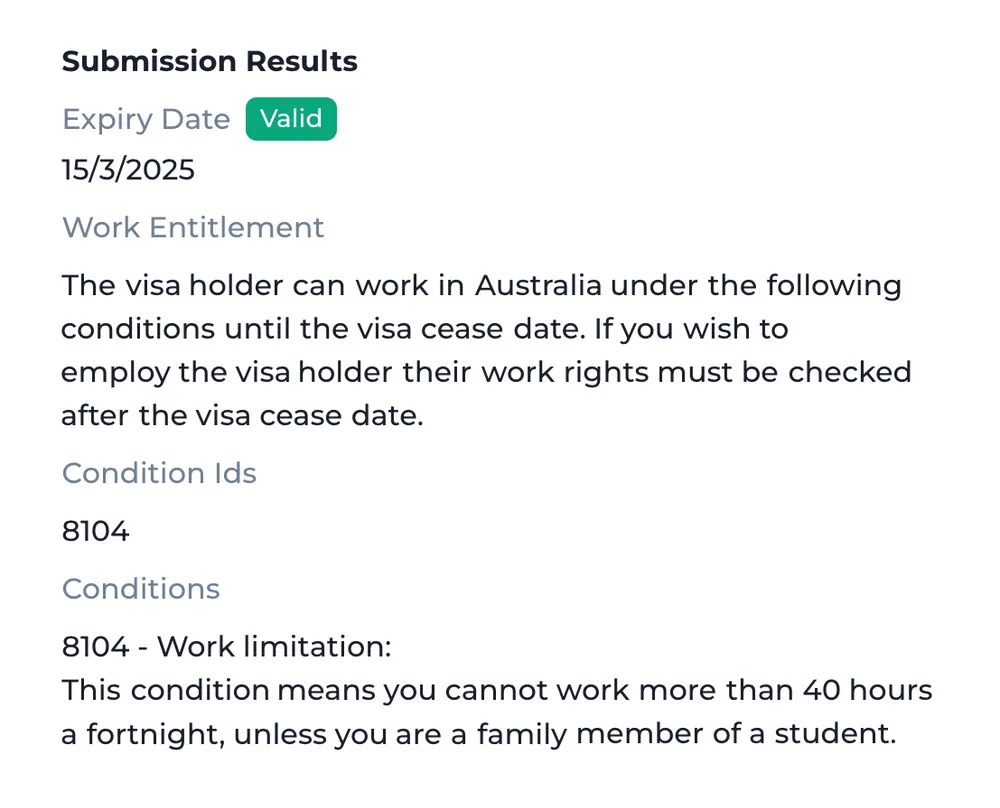
Results
The worker enters their visa details during onboarding and your team runs the check through VEVO from Canyou. See their visa status, class and subclass, expiry date, work entitlement and any conditions, such as a limit on hours.
Temporary and permanent visa holders
Run a new check at any time

Checked, not assumed
A photo of a visa isn’t proof. A check with Home Affairs, kept on file, is.
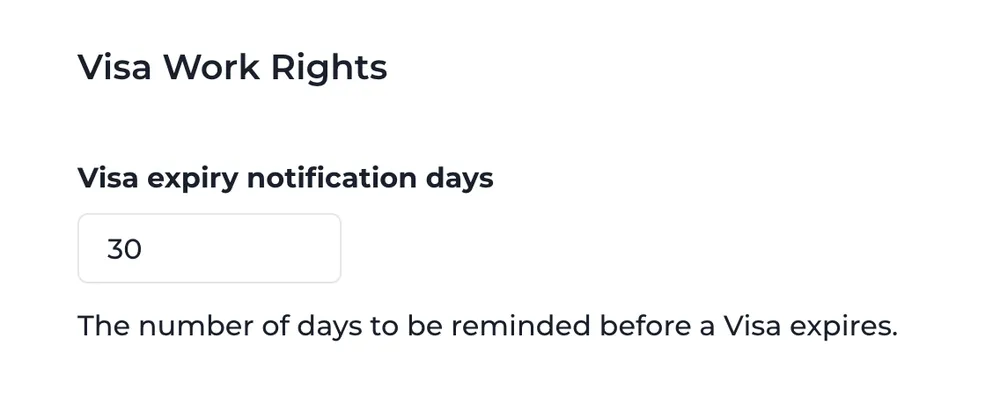
Expiry notice
Choose how many days’ notice you want before a visa expires. Change it any time in settings.
Set once, applies to every check
Past checks kept on the worker’s record
How it works
Add it to a new or existing onboarding workflow.
They enter their visa details from their phone.
Your team checks it with Home Affairs from Canyou.
The result and history stay on the worker’s record.

Customer story · Labour hire
“Canyou had everything we needed to fit into our business, easy to adapt to our own processes.”Lewis Dowling · Fast Labour Hire
15 min
per worker, down from 6–10 hrs
500+
workers managed at any one time
ISO
audit-ready records, every hire
Integrations
Your payroll, rostering and recruitment tools stay the source of truth. Canyou does the chasing and hands over validated data, so your team never has to log in to another app.
FROM THE WORKER'S PHONE
Collect
One link, any phone
Verify
ID, visa, licence validity
Monitor
Expiries & reminders
Validated once, pushed everywhere it's needed, with an audit trail kept.
INTO THE TOOLS YOU ALREADY RUN
 Syncs into Xero Payroll
 Syncs into MYOB Payroll
 Works alongside Deputy rostering
 Imports placements from JobAdder
 Sends cleared-to-work status to Workforce One
 Brings staff in from Cloud Payroll
ON THE WAY

Anything else, start a live chat or book a 30-minute call with our Australian team.
Book a 30-minute demo →Anyone who isn’t an Australian citizen is checked through the Department of Home Affairs’ VEVO system, with their permission, using their passport details. In Canyou, the worker enters their visa details during onboarding and an admin runs the check from their record. Our VEVO check guide covers the manual steps.
A VEVO check confirms the worker’s visa and work conditions on the day you run it. You still need to follow those conditions, such as limits on hours or employers, and check again when the visa changes or nears expiry.
Before the worker starts, before their visa expires and whenever their visa changes, plus regularly for anyone on a bridging visa. Canyou notifies you a set number of days before a visa expires, and you can run a new check at any time.
The worker enters their visa details in a Visa details task during onboarding. An admin on your team then runs the check from the worker’s record in Canyou.
The visa status, class and subclass, expiry date, work entitlement and any visa conditions, for temporary and permanent visa holders.
Visa checks are billed per check, from $7 (excluding GST) depending on your plan. You need an active subscription, and the subscription owner sets up payment. See the pricing page for each plan’s rate.
Work rights checked with Home Affairs, licences tracked to expiry and payroll details collected, at about 15 minutes per worker.
No credit card required · Cancel any time · Australian support 🇦🇺